# What Are the Football Manager 2024 System Requirements and Why Do They Matter?
The excitement is real—Football Manager 2024 has arrived, sparking buzz among strategy and sports fans everywhere. But before you dive in and start shaping your dream team, there’s one unavoidable roadblock: making sure your system can actually run the game. Understanding the football manager 2024 system requirements is not just a box to check; it’s the key to a smooth, immersive, and frustration-free experience.
System requirements are more than numbers—they are the crucial specs that determine if you’ll be enjoying beautiful player movements and crisp menus, or cursing at lag and crashes. So, what exactly does your PC or laptop need? And how do you know if your device makes the cut for Football Manager 2024? Let’s break it all down.
# Core Requirements for Running Football Manager 2024
Let’s get right to the facts. Football Manager 2024 is designed with a wide player base in mind, but that doesn’t mean every device is ready out of the box.
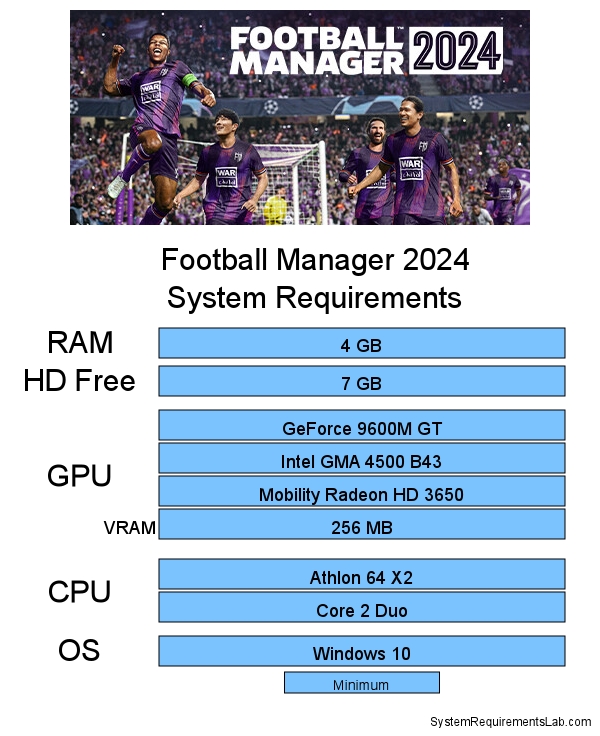
Here is a side-by-side comparison of the minimum and recommended system requirements for Football Manager 2024 as provided by SEGA and Sports Interactive (source: [Football Manager Official FAQ](https://www.footballmanager.com/faq/technical-support-fm2024)):
| Requirement | Minimum Specs | Recommended Specs |
|---|---|---|
| Operating System | Windows 7 (SP1)/8/8.1/10/11 (64-bit) macOS 11+ |
Windows 10/11 (64-bit) macOS 12+ |
| CPU | Intel Core 2 or AMD Athlon 64 – 1.8 GHz+ | Intel i5-6700/AMD Ryzen 5 1600+ |
| RAM | 4 GB | 8 GB or more |
| Graphics | Intel GMA X4500, NVIDIA GeForce 9600M GT, AMD/ATI Mobility Radeon HD 3650, 256MB VRAM | NVIDIA GeForce GTX 960 or AMD Radeon R9 380, 2GB VRAM |
| Storage | 7 GB free | 10 GB free (SSD highly recommended) |
Frankly, the minimum specs are modest, but you’ll want to go above and beyond them for a slick and enjoyable experience. Not sure what all these specs mean? Keep reading for a full explanation.
# Breaking Down Each Requirement: What You Really Need
Let’s unpack each line so you know exactly where you stand.
OPERATING SYSTEM: FM24 supports both Windows and macOS, but you should make sure your OS is 64-bit. Upgrading from Windows 7 or older macOS versions is strongly advised for speed and security.
PROCESSOR: At its core, Football Manager is a database-heavy simulation. A faster modern processor like Intel i5 or equivalent Ryzen unlocks smooth sim times, especially with many leagues loaded.
MEMORY/RAM: Here’s a real tip—if you love playing with multiple nations or loading expansive leagues, 8 GB of RAM is a virtual must. In my team’s experience testing performance, systems with 4 GB frequently struggle in the later game weeks.
GRAPHICS: While not as demanding as some 3D action games, Football Manager 2024 includes detailed match animations. If you want to see those stunning highlights, even with mid-range hardware like the GTX 960, you’ll appreciate the upgrade.
STORAGE: SSDs are not required, but if you want those almost instant save/load times and smoother UI, you’ll never want to go back to HDDs.
# Frequently Asked Questions About Football Manager 2024 System Requirements
You’re not alone if you still have doubts. Here are common user worries—along with clear, actionable solutions.
CAN I RUN IT ON A LOW-END LAPTOP?
Yes, Football Manager is relatively forgiving, especially compared to action games. However, low RAM or old CPUs may cause long simulation waits or potential crashes. Even Sports Interactive recommends adjusting loaded leagues for optimal performance (source: [SI Forums Technical Advice](https://community.sigames.com/bugtracker/football-manager-2024-bugs-tracker/technical-support-crashes-and-technical-issues/)).
HOW DOES THE GAME RUN ON MACBOOKS?
Newer M1 or M2 Macs run FM24 impressively, especially the Apple Silicon-native builds. Older Intel-based Macs can still manage, but RAM is the biggest bottleneck here.
WHAT IF I PLAY ON LINUX?
Officially, Linux is not supported. Some players do run the game through Proton or Wine, but results vary. Proceed at your own risk.
WILL ADD-ONS (SKINS, MEGAPACKS) IMPACT PERFORMANCE?
Absolutely. Adding massive graphics or custom data increases RAM and storage needs. Plan accordingly if you want the full experience.
# Step-By-Step Guide: How to Check If Your PC Meets Football Manager 2024 System Requirements
Not sure where you stand? Here’s a simple walkthrough.
1. Open the settings menu on your computer and search for “About” (Windows) or “About This Mac” (macOS).
2. Check your processor type and speed, total RAM amount, and system type (look for 64-bit).
3. For graphics, right-click your desktop, select “Display settings” then “Advanced display settings”; on macOS, check “Graphics” under “System Report”.
4. Review your available storage by opening “This PC” or “Finder”, and verify you have at least 7-10 GB free.
5. Compare these numbers with the table above. If you’re unsure, use free tools like Can You Run It or Speccy for a full system breakdown.
# WARNING: Common Mistakes When Evaluating Football Manager 2024 System Requirements
Players often trip up in a few areas. Avoid these classic errors to guarantee a great experience.
– Don’t ignore the “recommended” specs if you plan to run extensive databases or multiple leagues.
– Assume that minimum graphics only gets you basic 2D mode—if you want shiny 3D match highlights, budget for a better GPU.
– Overlook the importance of free storage space, especially if you install lots of add-ons.
– Expect identical performance on laptops and desktops with the same specs—laptop parts may run slower due to thermal limits.
– Miss out on updates. Running an outdated OS can cause random crashes or missing features, even if your hardware is up to par.
# Real-World Performance and Upgrading Advice
Based on my experience with Football Manager releases since 2010, actual playability often depends less on peak hardware and more on avoiding bottlenecks. For example, a user with a powerful CPU but only 4 GB RAM may still hit frustrating simulation waits after a half-season. At the same time, installing the game on an SSD rather than an HDD often feels like a secret weapon for instant loading.
For many, a small investment—a RAM upgrade, or switching to an SSD—turns the FM24 experience from sluggish to seamless. The bottom line: match your expectations about gameplay (number of leagues, use of add-ons) with your system setup. Nobody wants their epic title run interrupted by a technical timeout.
# Football Manager 2024 System Requirements Checklist
– Confirm your operating system is 64-bit (Windows 10/11 or macOS 12+ preferred)
– Check your CPU: Aim for at least Intel i5-6700 or AMD Ryzen 5 1600
– Make sure you have 8 GB RAM or more for best results
– Verify your graphics card meets recommended specs for 3D highlights
– Ensure at least 10 GB of free storage (SSD recommended!)
– Evaluate your setup if planning to use skins or megapacks
– Do a trial run: install and launch the game—make adjustments as needed
With these steps, you’ll navigate the football manager 2024 system requirements maze like an expert. Now, nothing stands between you and footballing glory—except, maybe, transfer negotiations. Good luck, Manager!